CHRIS HUITT
british airways · self-directed redesign · HCI GRADUATE CERTIFICATE · 11 weeks
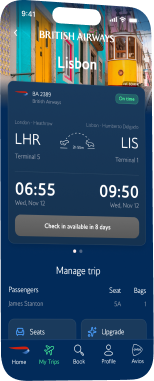
A browser-dependent app rebuilt into one native experience that turns browser detours into two-tap trip changes
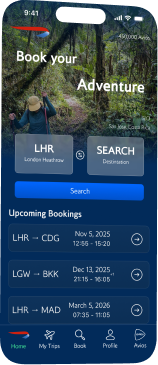
Reimagining BA's mobile app so inspiration, booking, and trip management finally live in one place.







the problem
BA became a premium airline experience that stopped at the terminal.
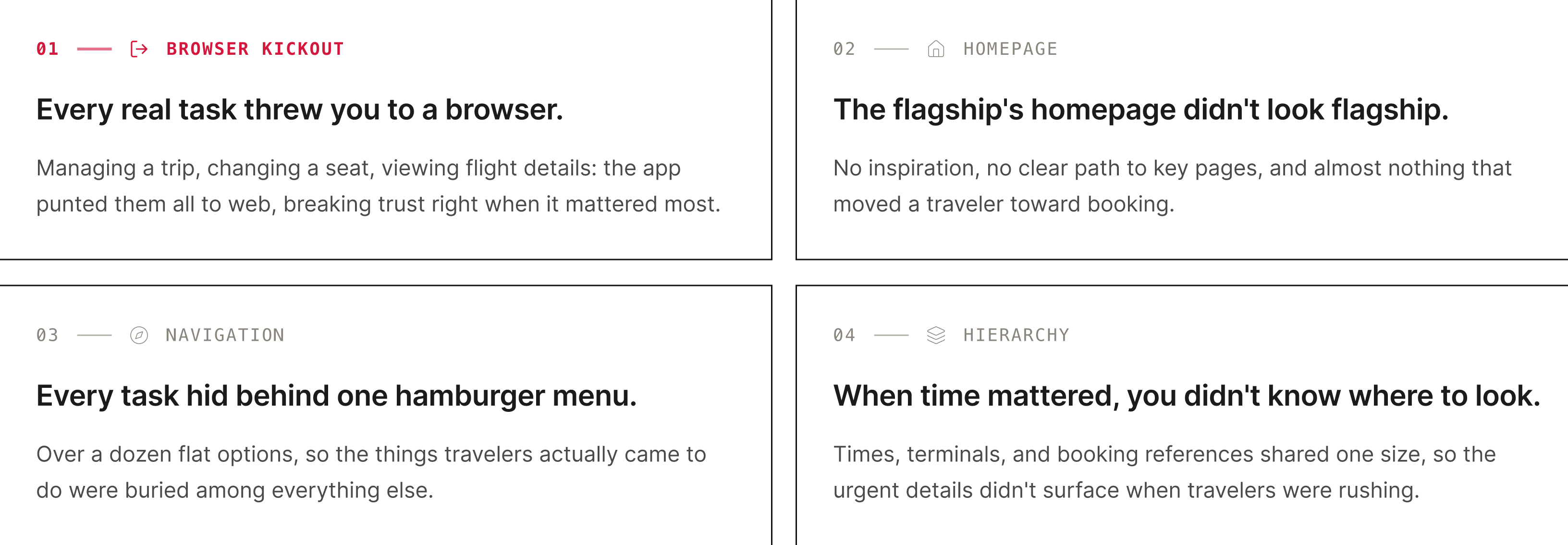
Before I designed anything, I audited the app end to end. Four failures kept surfacing, and every one eroded trust at a moment that mattered.
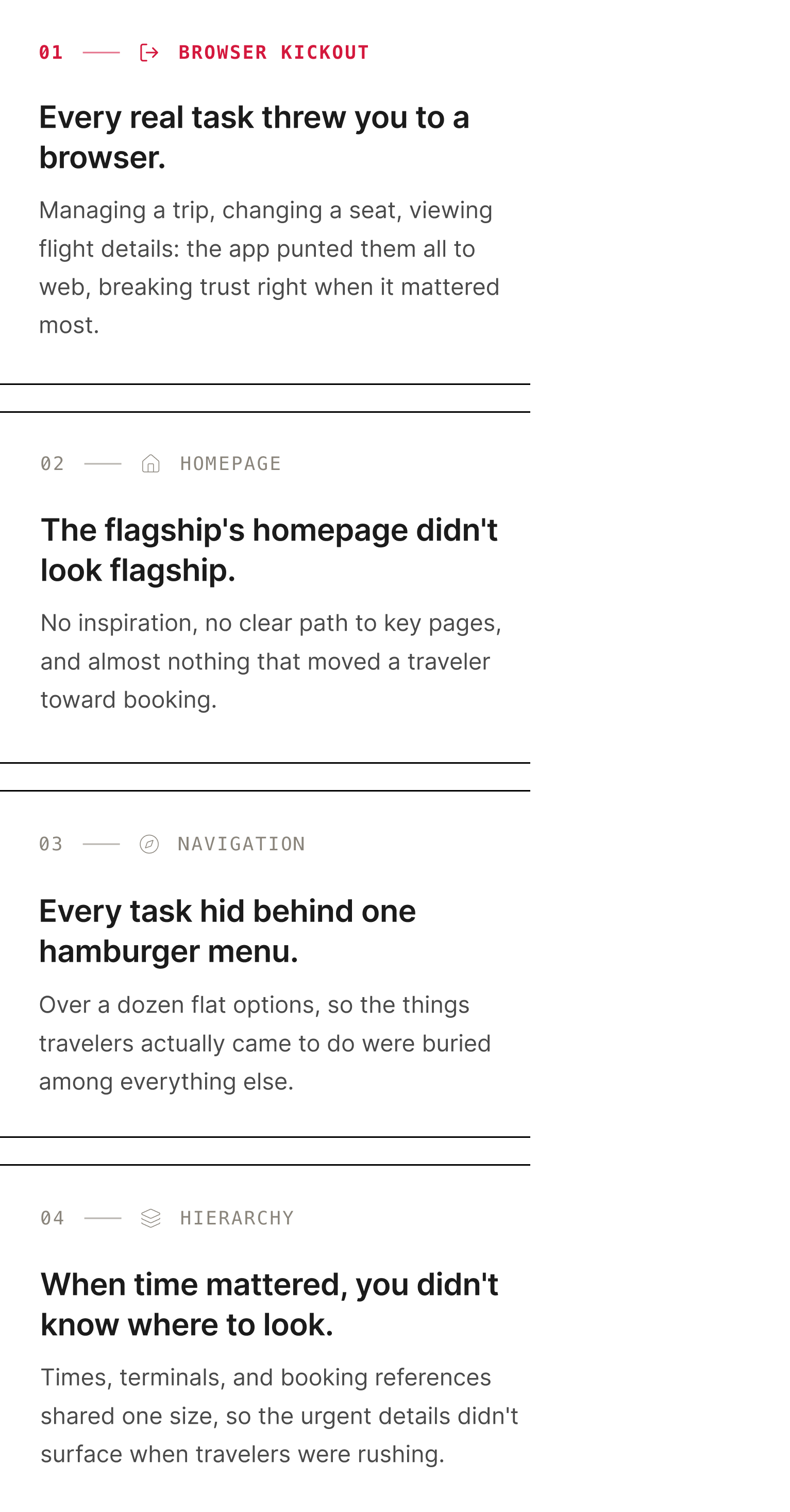
That raised one question:
How might we keep every part of the trip inside the app, from first spark to final boarding pass?
research
I needed to see the friction through someone with more at stake than me.
As a recent BA flyer, I already felt the friction firsthand. To see it through someone with more at stake, I leaned on two methods:
- Heuristic evaluation: walked the full journey (open, search, book, manage) and logged every usability break.
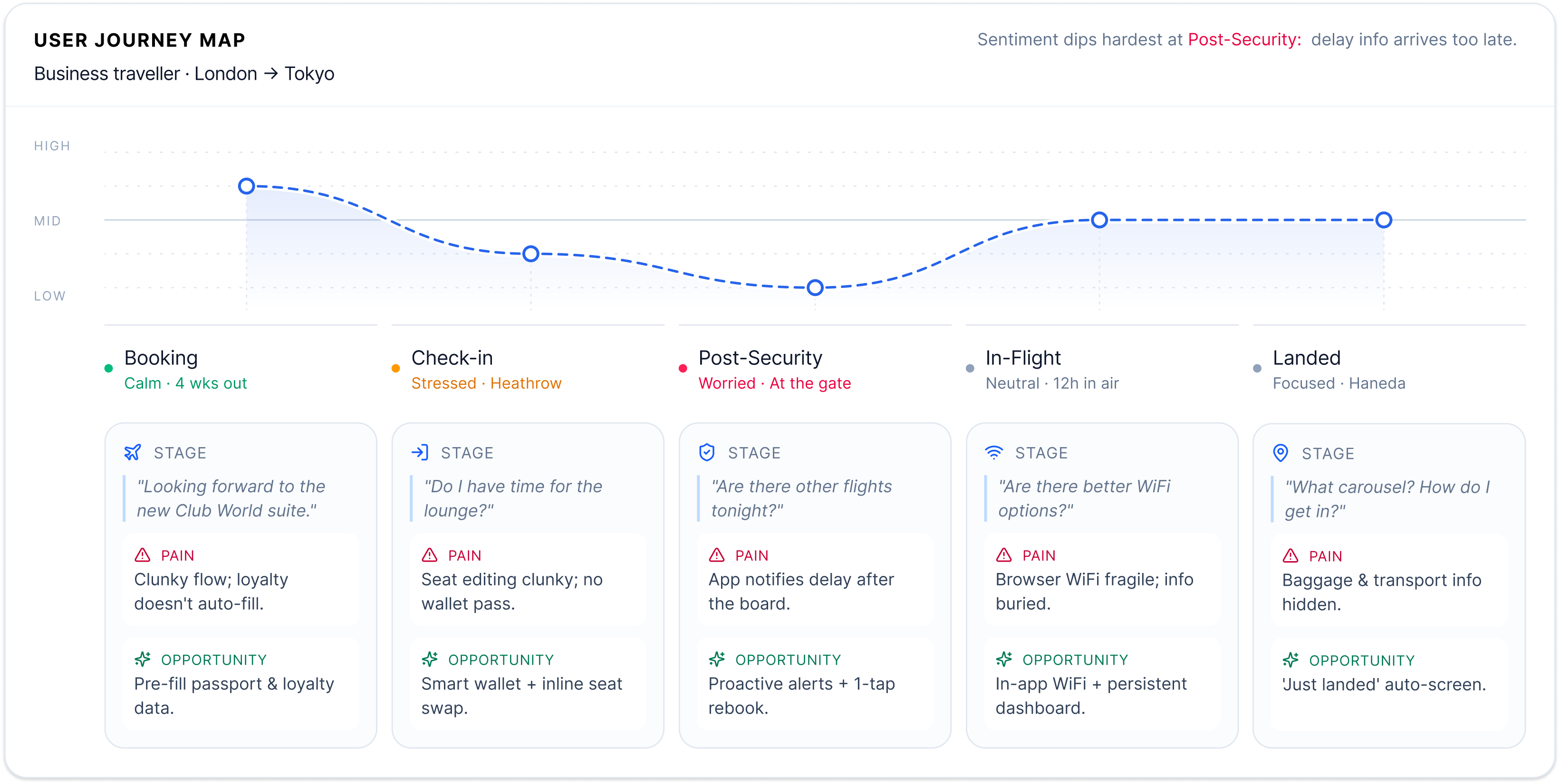
- Journey map: traced James Stanton, a weekly business flyer who depends on the app from booking to landing, across five stages.
sketches
Sketching the screens BA never had.
Three flows that never existed: a homepage worth opening, a booking flow, and trip management. High-fidelity came next in Figma, using BA's real Pantone colors and typeface so the work read as an evolution of the brand, not a reskin.
Home
Cycling hero & quick booking
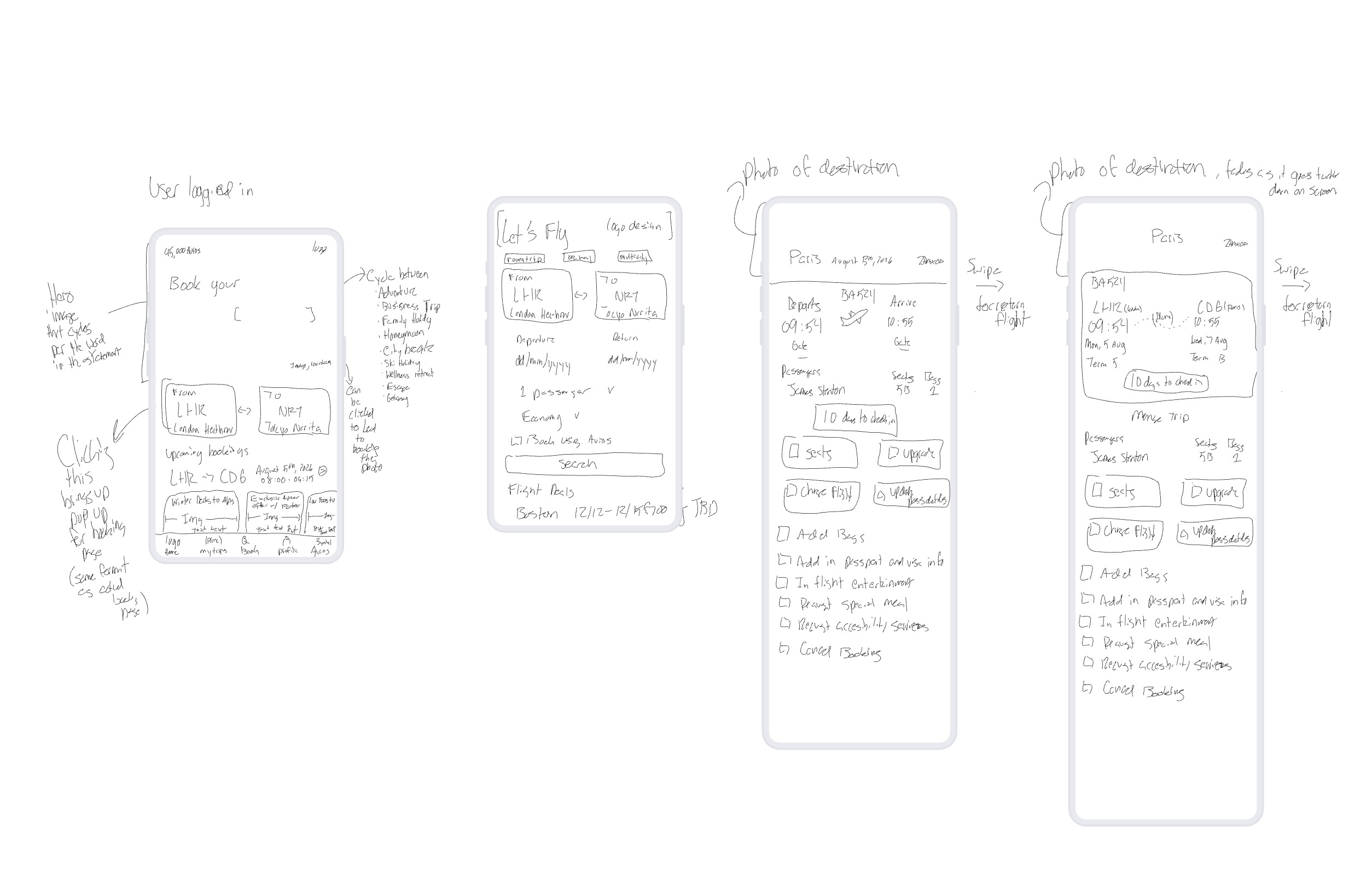
booking
Action led entry point
trip info
In-app trip management
01
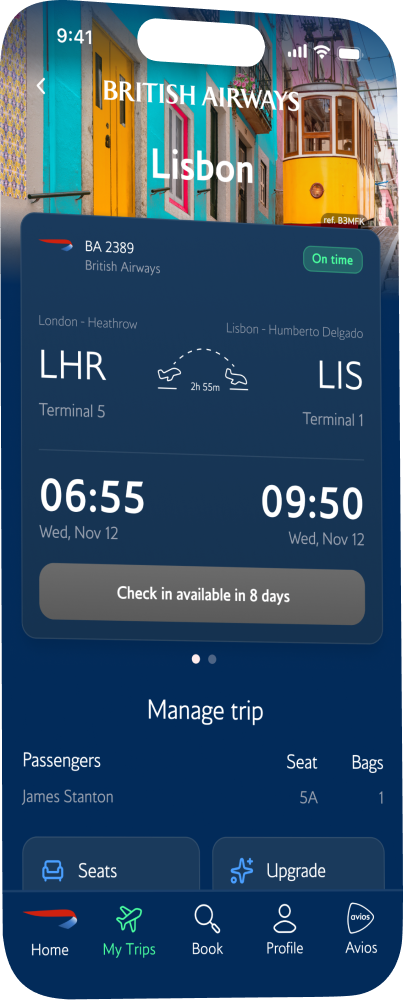
Destination photo fades into the BA brand color as the user scrolls.
02
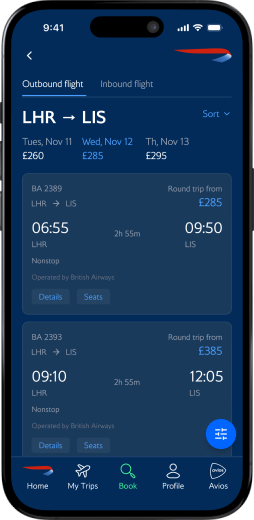
Type hierarchy on the flight card leads with time → date → airport.
03
Swipe left on the card to reveal return flight details.
04
All trip-management features live in-app instead of bouncing to the browser.
01
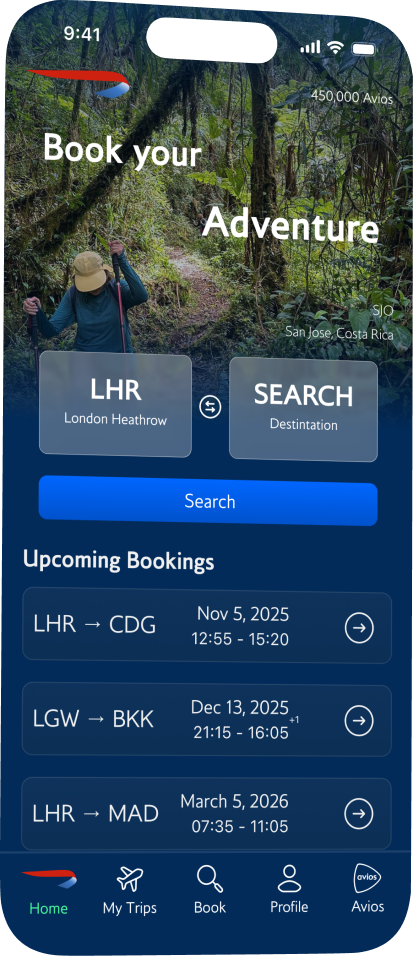
Hero image cycles through travel contexts (Adventure, Business Trip, Honeymoon). Tap the image to book that destination.
02
Quick-booking shortcut: pick airports inline. Mirrors the main booking page for familiarity.
03
Avios-linked promos and deals to reward repeat use.
01
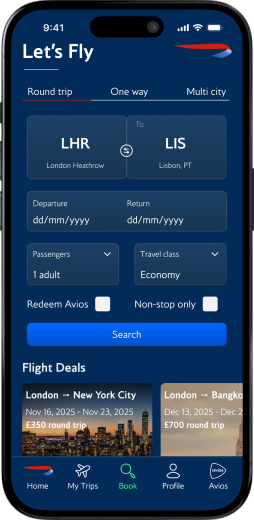
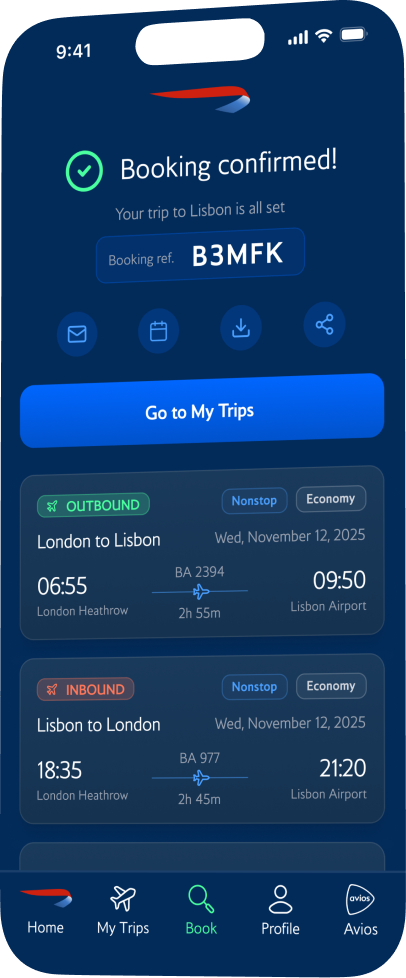
"Let's Fly" keeps the action-led copy theme, initiating the user into the flow.
02
Booking layout mirrors the home page to carry familiarity through the journey.
usability testing
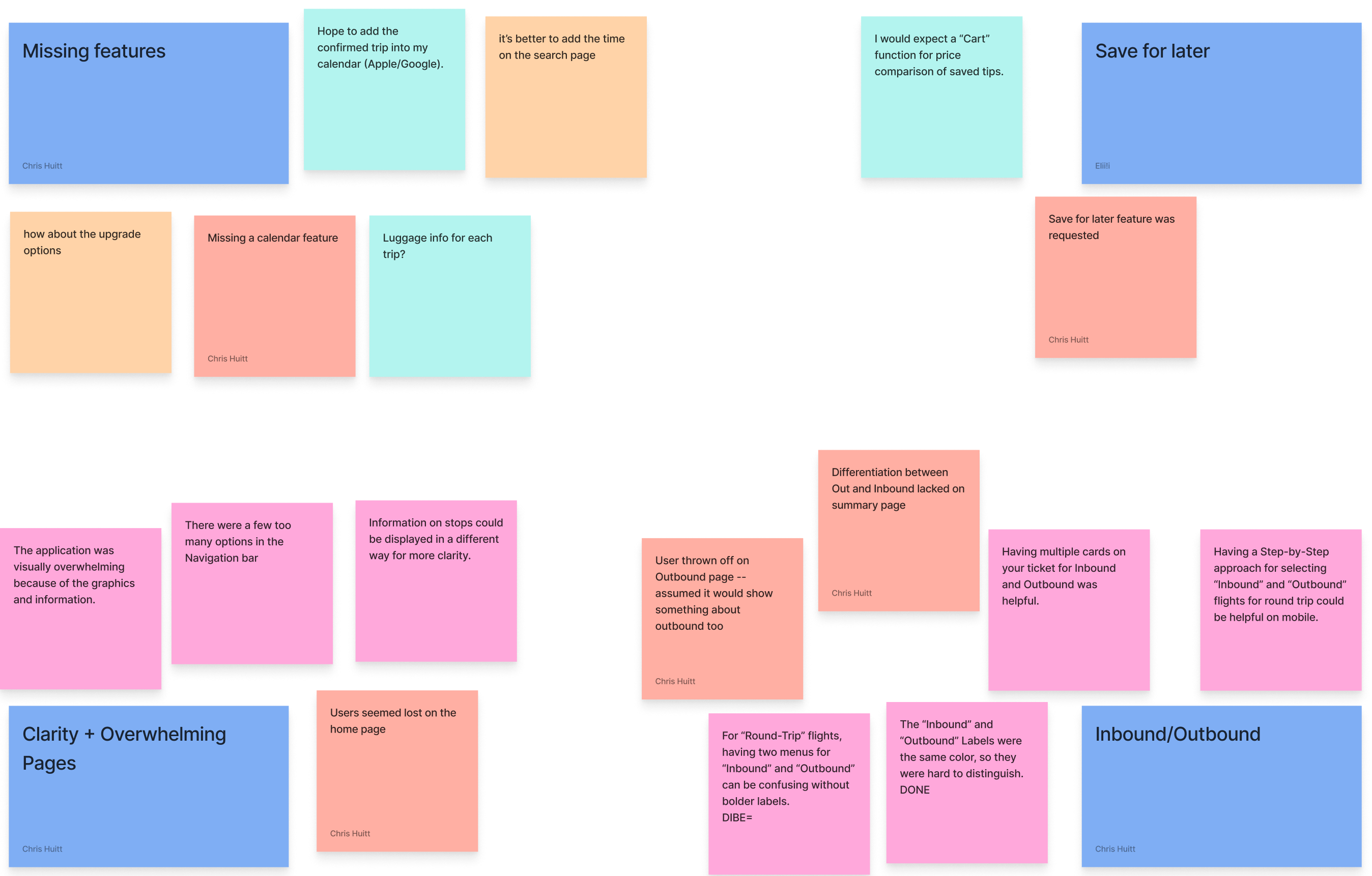
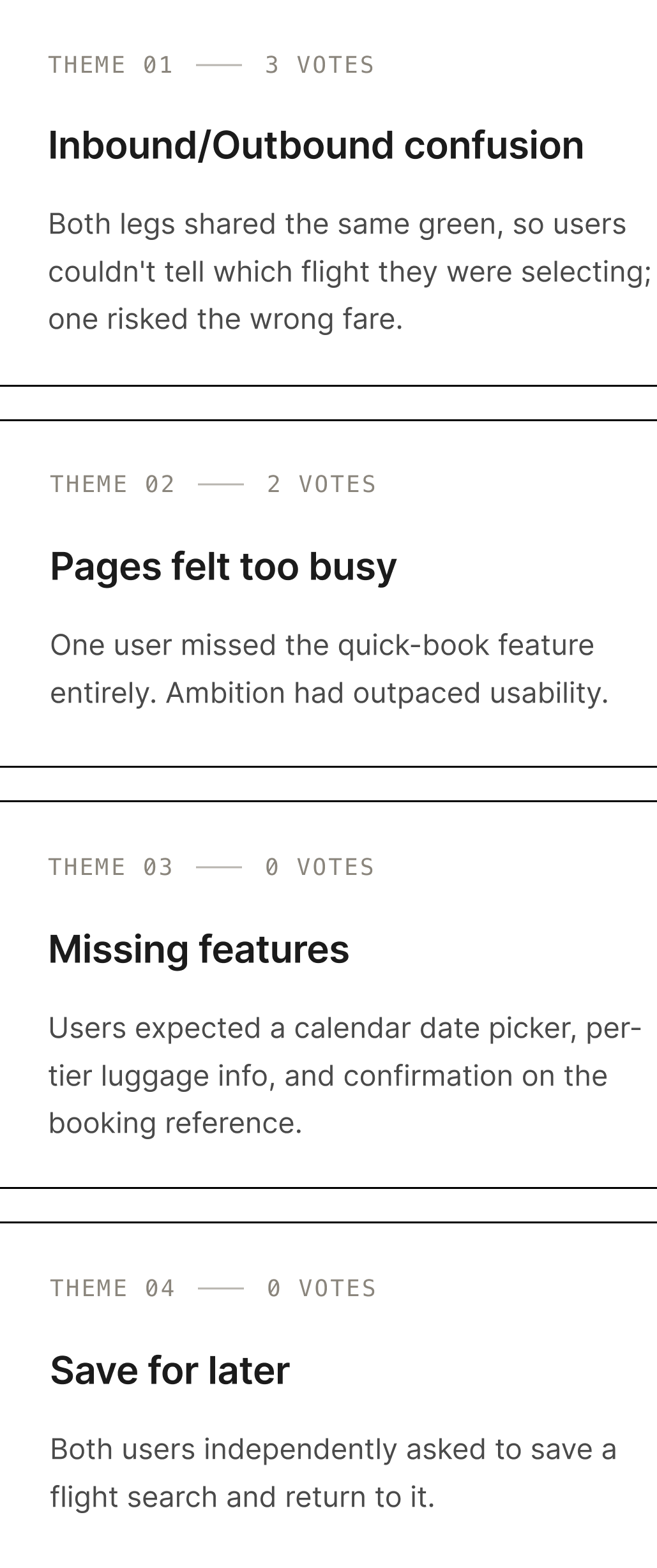
A same-day London to Lisbon booking exposed four design flaws.
- The task: book a same-day round-trip, London to Lisbon.
- The setup: five participants, run on my BA prototype and the Virgin Atlantic app to benchmark.
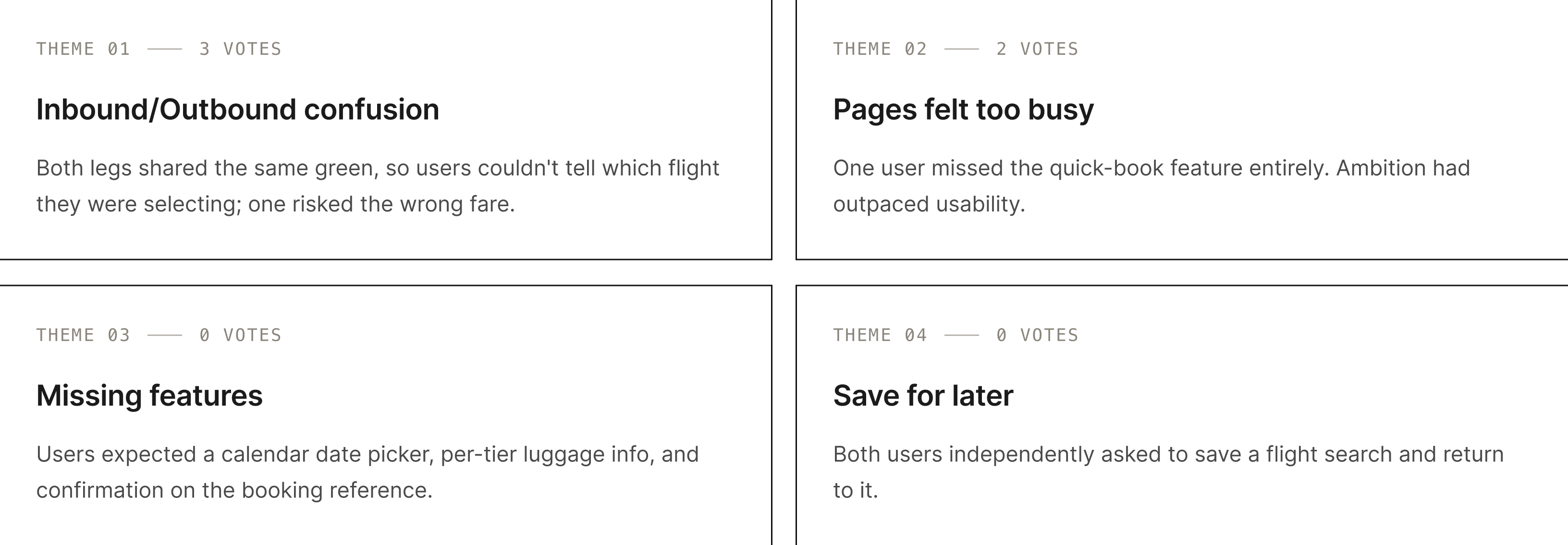
- The synthesis: grouped into four themes with a KJ affinity analysis.
solutions
Where the research became design.
Each decision came from the heuristic evaluation, the journey map, or usability testing.
01
A homepage that sells the trip before the form
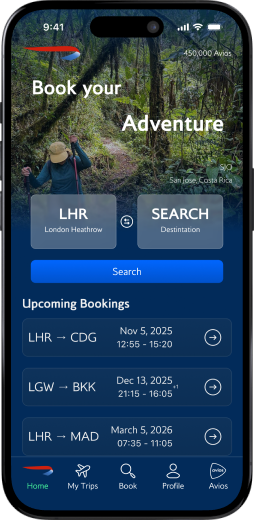
A cycling hero rotates through travel contexts so users picture their next trip, then search, upcoming trips, Avios, and deals each earn their place below.
02
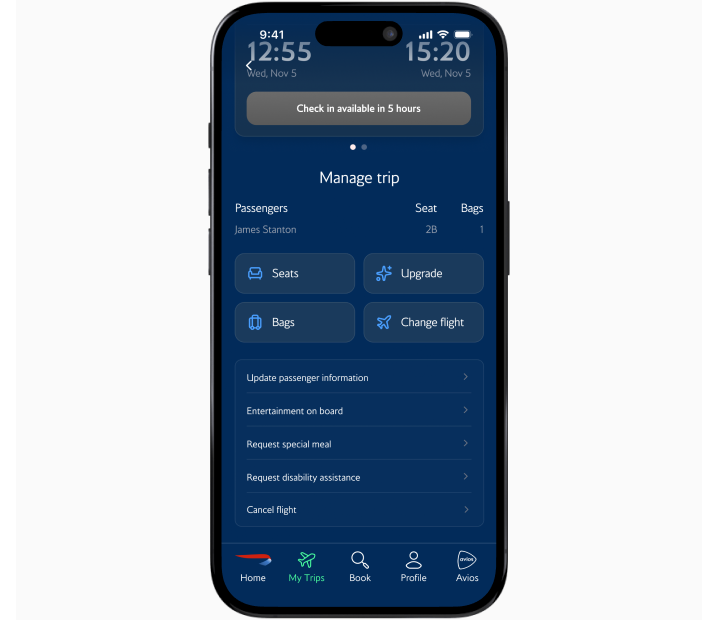
Trip management that never leaves the app
"Manage My Booking" used to throw you to a browser. Now it's a native Trip Detail page: flight status and check-in countdown up top, secondary actions grouped below.
03
A booking flow built for confidence
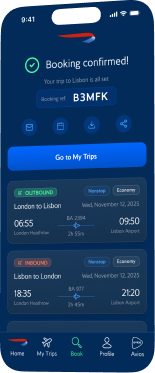
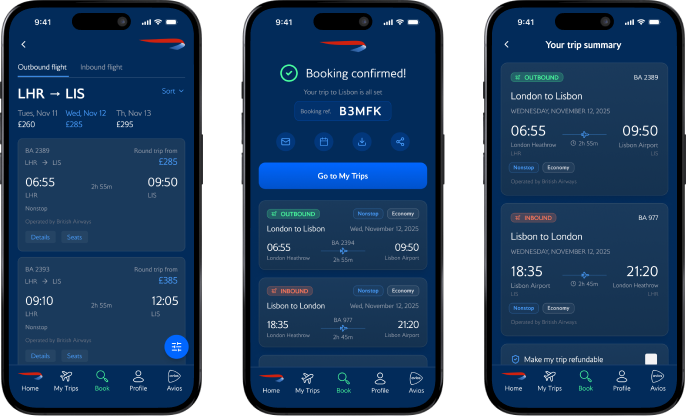
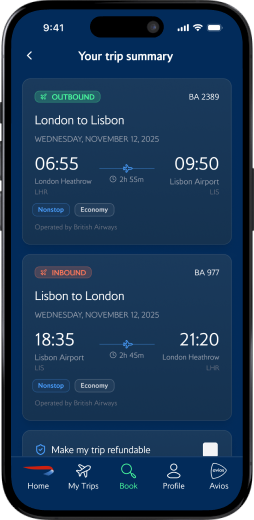
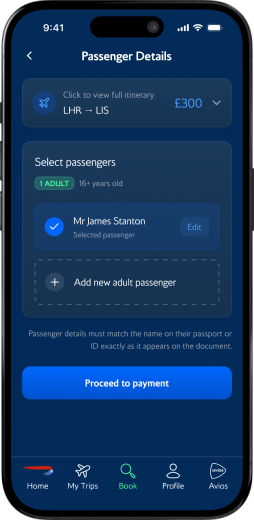
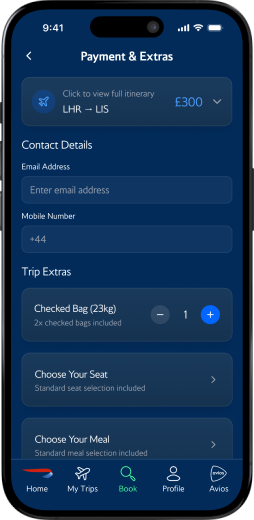
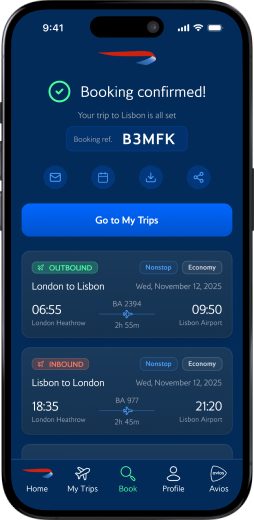
Seven screens from search to confirmation, with color-coded inbound/outbound tags, a running total, and a transparent price breakdown, so you always know where you are.
Two other changes:
04
A five-tab nav replaced a 12-item hamburger menu, built around what users do at home and at the gate.
05
Proper typographic hierarchy on the flight screen so departure and arrival times dominate and a rushed traveler knows when and where in two seconds.
the experience
One experience, two core flows, from booking to landing.
booking flow
Home

Search
Flights
Summary
Passengers
Payment

Confirmed
trip management flow
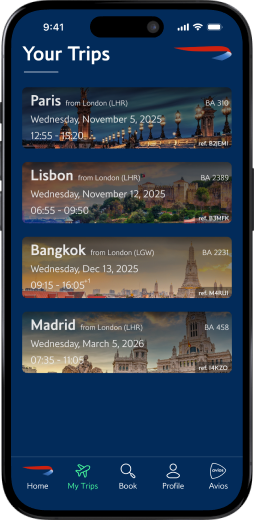
Your Trips
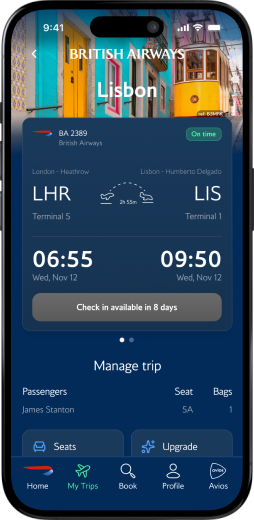
Trip Detail
reflection
Test earlier, simplify sooner.
The quick-book feature I was proudest of got missed by two of three users. The strongest version of a screen is usually the one with the least on it.
The homepage didn't need to pick a parent. It needed to sequence.
Running the same task on Virgin Atlantic showed where my design held up and where it didn't, like the inbound/outbound confusion they handled better. Benchmarking turned opinions into evidence.
I tested, but I didn't close the loop.
The redesign is research-informed and iterated, but a second round on the refined screens would have made the findings conclusive, not just directional.
PROTOTYPE
Try the booking flow yourself.
The complete app, from the cycling home screen through booking to in-app trip management. Best viewed on desktop.
british airways · self-directed redesign · HCI GRADUATE CERTIFICATE · 11 weeks
A browser-dependent app rebuilt into one native experience that turns browser detours into two-tap trip changes
Reimagining BA's mobile app so inspiration, booking, and trip management finally live in one place.
the problem
BA became a premium airline experience that stopped at the terminal.
Before I designed anything, I audited the app end to end. Four failures kept surfacing, and every one eroded trust at a moment that mattered.
That raised one question:
How might we keep every part of the trip inside the app, from first spark to final boarding pass?
research
I needed to see the friction through someone with more at stake than me.
As a recent BA flyer, I already felt the friction firsthand. To see it through someone with more at stake, I leaned on two methods:
- Heuristic evaluation: walked the full journey (open, search, book, manage) and logged every usability break.
- Journey map: traced James Stanton, a weekly business flyer who depends on the app from booking to landing, across five stages.
sketches
Sketching the screens BA never had.
Three flows that never existed: a homepage worth opening, a booking flow, and trip management. High-fidelity came next in Figma, using BA's real Pantone colors and typeface so the work read as an evolution of the brand, not a reskin.
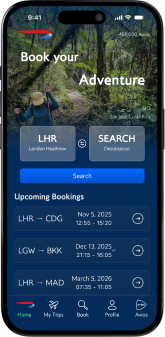
Home
Cycling hero & quick booking
booking
Action led entry point
trip info
In-app trip management
01
Hero image cycles through travel contexts (Adventure, Business Trip, Honeymoon). Tap the image to book that destination.
02
Quick-booking shortcut: pick airports inline. Mirrors the main booking page for familiarity.
03
Avios-linked promos and deals to reward repeat use.
01
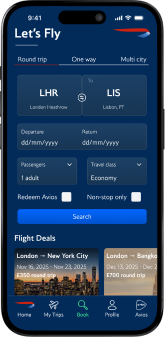
"Let's Fly" keeps the action-led copy theme, initiating the user into the flow.
02
Booking layout mirrors the home page to carry familiarity through the journey.
01
Destination photo fades into the BA brand color as the user scrolls.
02
Type hierarchy on the flight card leads with time → date → airport.
03
Swipe left on the card to reveal return flight details.
04
All trip-management features live in-app instead of bouncing to the browser.
usability testing
A same-day London to Lisbon booking exposed four design flaws.
- The task: book a same-day round-trip, London to Lisbon.
- The setup: five participants, run on my BA prototype and the Virgin Atlantic app to benchmark.
- The synthesis: grouped into four themes with a KJ affinity analysis.
solutions
Where the research became design.
Each decision came from the heuristic evaluation, the journey map, or usability testing.
01
A homepage that sells the trip before the form
A cycling hero rotates through travel contexts so users picture their next trip, then search, upcoming trips, Avios, and deals each earn their place below.
02
Trip management that never leaves the app
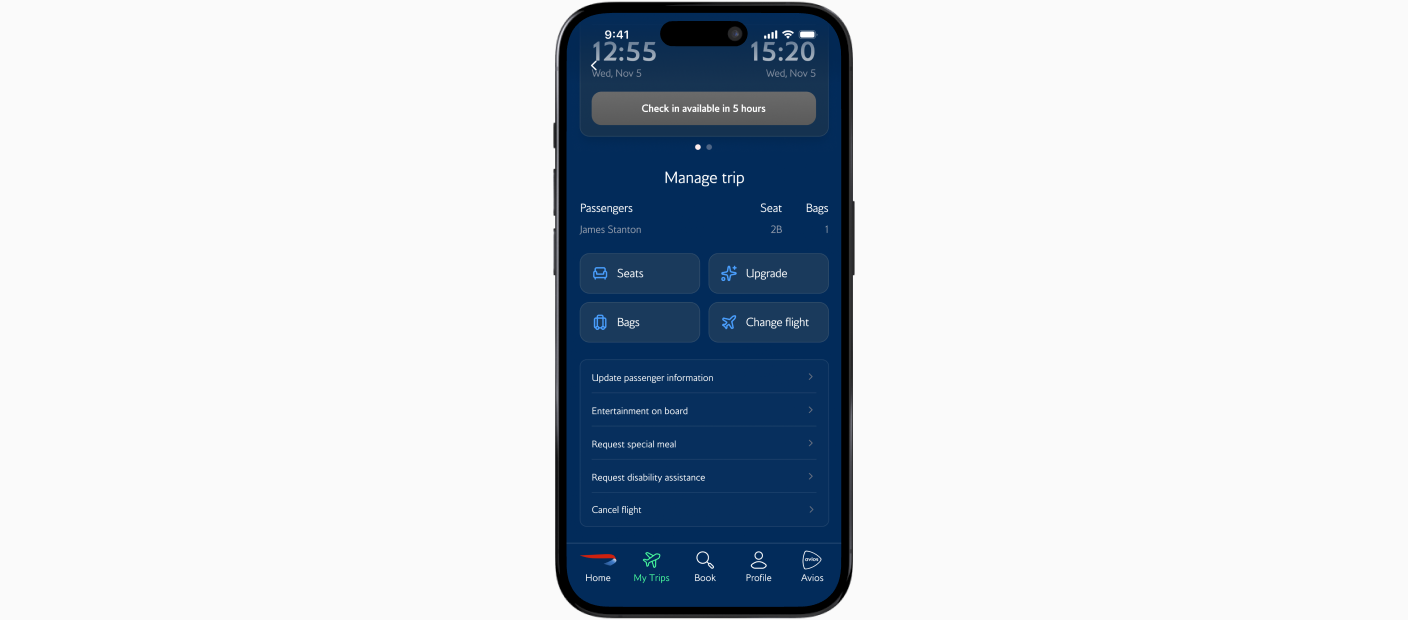
"Manage My Booking" used to throw you to a browser. Now it's a native Trip Detail page: flight status and check-in countdown up top, secondary actions grouped below.
03
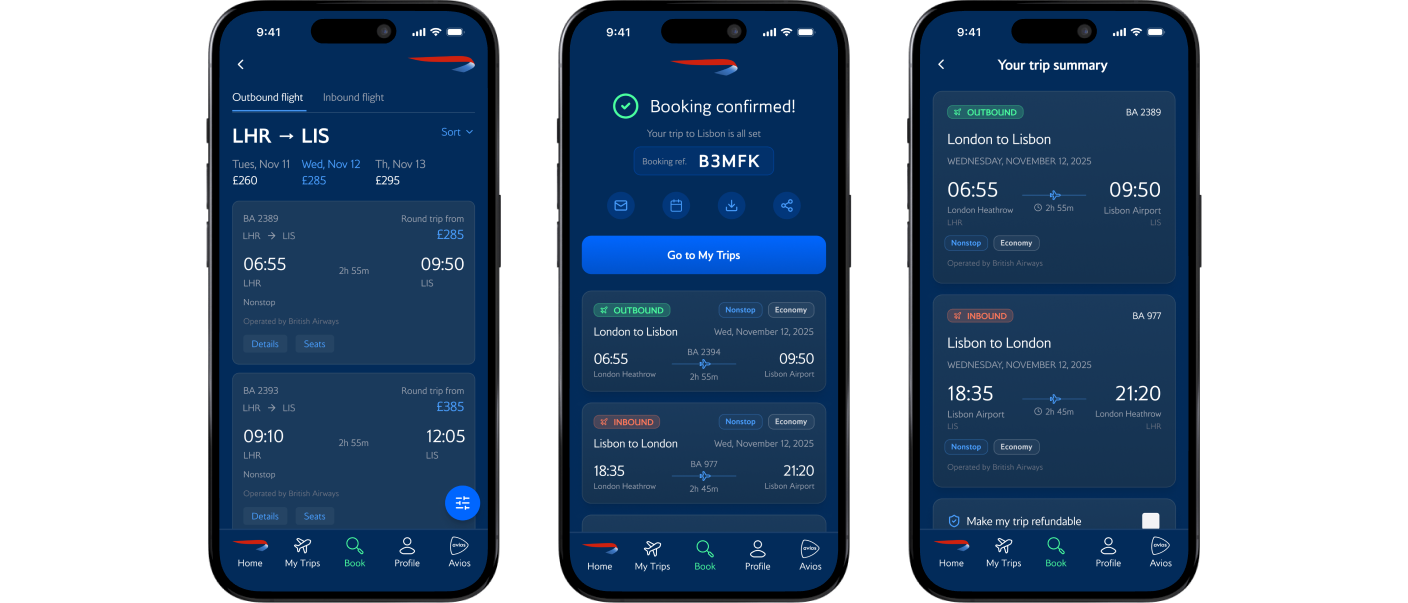
A booking flow built for confidence
Seven screens from search to confirmation, with color-coded inbound/outbound tags, a running total, and a transparent price breakdown, so you always know where you are.
Two other changes:
04
A five-tab nav replaced a 12-item hamburger menu, built around what users do at home and at the gate.
05
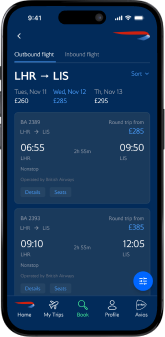
Proper typographic hierarchy on the flight screen so departure and arrival times dominate and a rushed traveler knows when and where in two seconds.
the experience
One experience, two core flows, from booking to landing.
booking flow
Home

Search

Flights

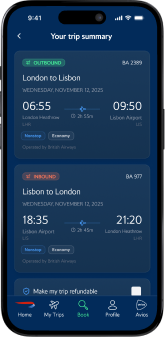
Summary

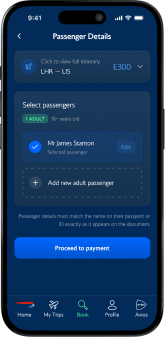
Passengers

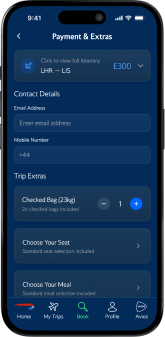
Payment

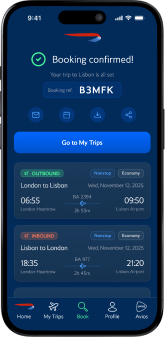
Confirmed
trip management flow
Your Trips
Trip Detail
reflection
Test earlier, simplify sooner.
The quick-book feature I was proudest of got missed by two of three users. The strongest version of a screen is usually the one with the least on it.
The homepage didn't need to pick a parent. It needed to sequence.
Running the same task on Virgin Atlantic showed where my design held up and where it didn't, like the inbound/outbound confusion they handled better. Benchmarking turned opinions into evidence.
I tested, but I didn't close the loop.
The redesign is research-informed and iterated, but a second round on the refined screens would have made the findings conclusive, not just directional.
PROTOTYPE
Try the booking flow yourself.
The complete app, from the cycling home screen through booking to in-app trip management. Best viewed on desktop.
british airways · self-directed redesign · HCI GRADUATE CERTIFICATE · 11 weeks
A browser-dependent app rebuilt into one native experience that turns browser detours into two-tap trip changes
Reimagining BA's mobile app so inspiration, booking, and trip management finally live in one place.
the problem
BA became a premium airline experience that stopped at the terminal.
Before I designed anything, I audited the app end to end. Four failures kept surfacing, and every one eroded trust at a moment that mattered.
That raised one question:
How might we keep every part of the trip inside the app, from first spark to final boarding pass?
research
I needed to see the friction through someone with more at stake than me.
As a recent BA flyer, I already felt the friction firsthand. To see it through someone with more at stake, I leaned on two methods:
- Heuristic evaluation: walked the full journey (open, search, book, manage) and logged every usability break.
- Journey map: traced James Stanton, a weekly business flyer who depends on the app from booking to landing, across five stages.
sketches
Sketching the screens BA never had.
Three flows that never existed: a homepage worth opening, a booking flow, and trip management. High-fidelity came next in Figma, using BA's real Pantone colors and typeface so the work read as an evolution of the brand, not a reskin.
Home
Cycling hero & quick booking
booking
Action led entry point
trip info
In-app trip management
01
Hero image cycles through travel contexts (Adventure, Business Trip, Honeymoon). Tap the image to book that destination.
02
Quick-booking shortcut: pick airports inline. Mirrors the main booking page for familiarity.
03
Avios-linked promos and deals to reward repeat use.
01
"Let's Fly" keeps the action-led copy theme, initiating the user into the flow.
02
Booking layout mirrors the home page to carry familiarity through the journey.
01
Destination photo fades into the BA brand color as the user scrolls.
02
Type hierarchy on the flight card leads with time → date → airport.
03
Swipe left on the card to reveal return flight details.
04
All trip-management features live in-app instead of bouncing to the browser.
usability testing
A same-day London to Lisbon booking exposed four design flaws.
- The task: book a same-day round-trip, London to Lisbon.
- The setup: five participants, run on my BA prototype and the Virgin Atlantic app to benchmark.
- The synthesis: grouped into four themes with a KJ affinity analysis.
solutions
Where the research became design.
Each decision came from the heuristic evaluation, the journey map, or usability testing.
01
A homepage that sells the trip before the form
A cycling hero rotates through travel contexts so users picture their next trip, then search, upcoming trips, Avios, and deals each earn their place below.
02
Trip management that never leaves the app
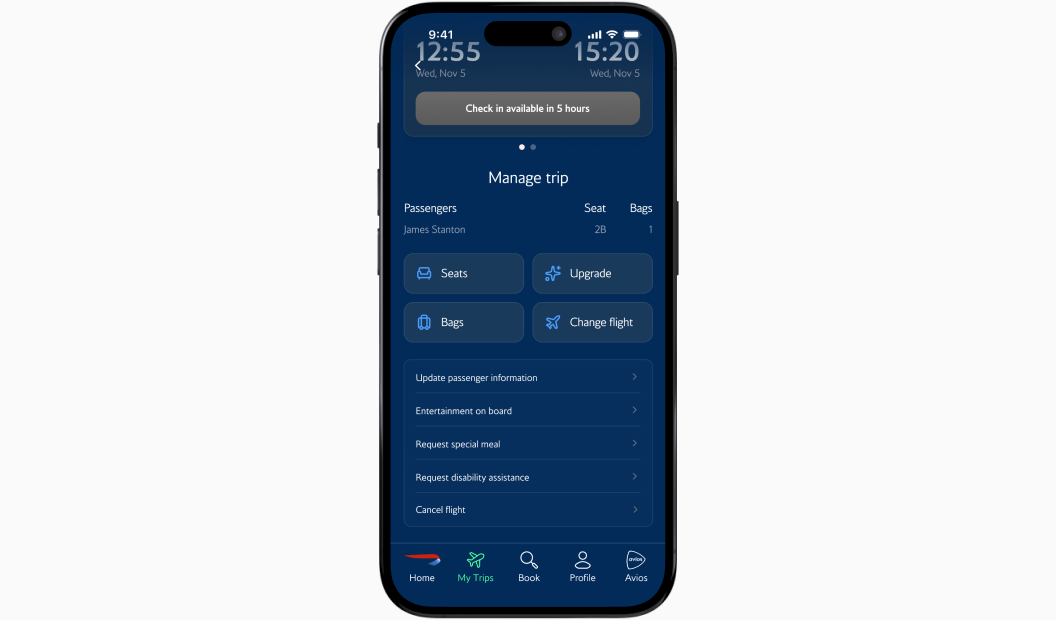
"Manage My Booking" used to throw you to a browser. Now it's a native Trip Detail page: flight status and check-in countdown up top, secondary actions grouped below.
03
A booking flow built for confidence
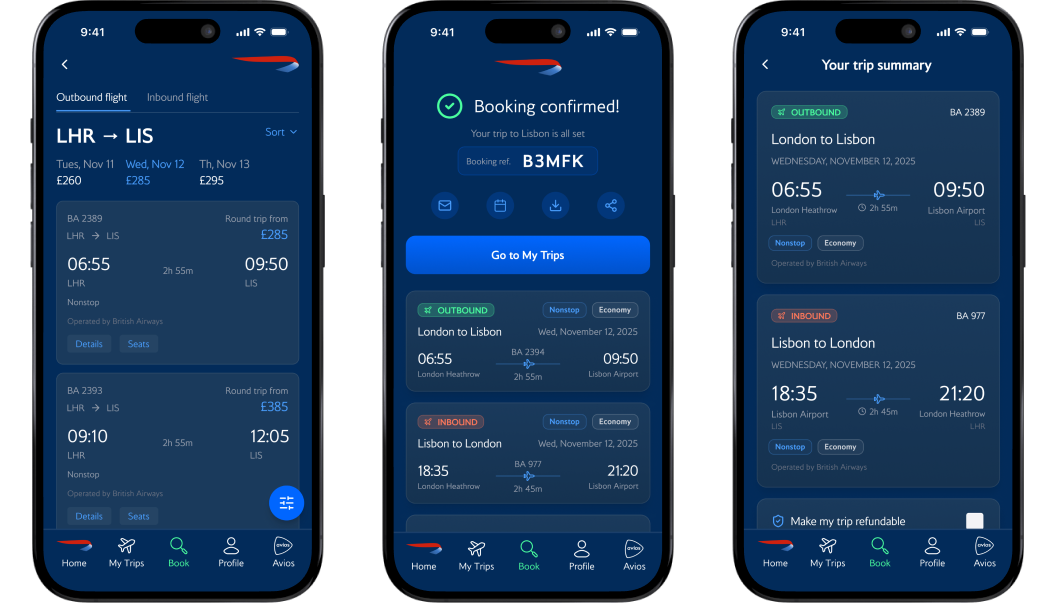
Seven screens from search to confirmation, with color-coded inbound/outbound tags, a running total, and a transparent price breakdown, so you always know where you are.
Two other changes:
04
A five-tab nav replaced a 12-item hamburger menu, built around what users do at home and at the gate.
05
Proper typographic hierarchy on the flight screen so departure and arrival times dominate and a rushed traveler knows when and where in two seconds.
reflection
Test earlier, simplify sooner.
The quick-book feature I was proudest of got missed by two of three users. The strongest version of a screen is usually the one with the least on it.
The homepage didn't need to pick a parent. It needed to sequence.
Running the same task on Virgin Atlantic showed where my design held up and where it didn't, like the inbound/outbound confusion they handled better. Benchmarking turned opinions into evidence.
I tested, but I didn't close the loop.
The redesign is research-informed and iterated, but a second round on the refined screens would have made the findings conclusive, not just directional.
the experience
One experience, two core flows, from booking to landing.
booking flow
Home
Search
Flights
Summary
Passengers
Payment
Confirmed
trip management flow
Your Trips
Trip Detail
PROTOTYPE
Try the booking flow yourself.
The complete app, from the cycling home screen through booking to in-app trip management. Best viewed on desktop.